

If you are a daily commuter on the Dwarka Expressway, the Local Monthly Pass priced at just ₹340 is one of the most pocket-friendly ways to travel. It saves you from paying toll every day, reduces waiting time, and offers a hassle-free driving experience for residents living within the permitted radius.

But what happens when your monthly pass expires?
In this guide, we’ll walk you through exactly how to renew your Dwarka Expressway monthly pass, what documents you need, and common mistakes you must avoid — so your commute stays smooth and uninterrupted.
Who Can Renew the Local Monthly Pass?
You are eligible to renew the pass if:
- You live within the local radius (approx. 20 km) of the toll plaza
- You already have a FASTag linked to your vehicle
- You previously purchased a local monthly pass with valid address proof
If your residence or vehicle details have changed, you may need to re-upload documents during renewal.
How to Renew Your Dwarka Expressway Monthly Pass (2025 Guide)
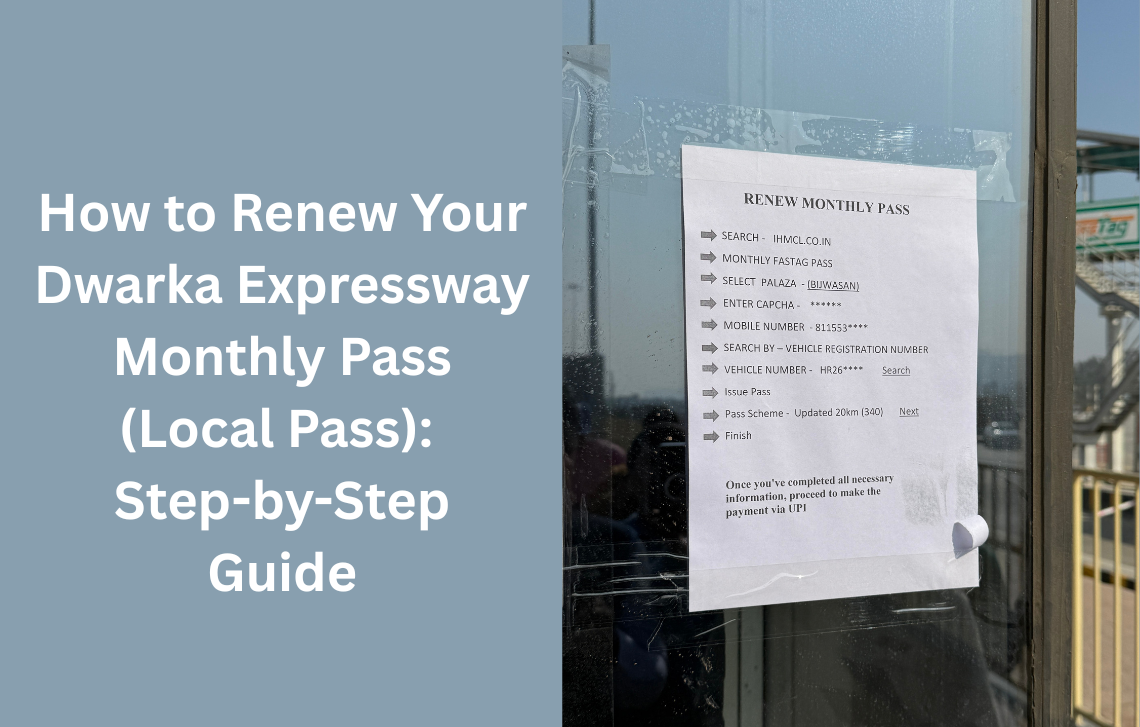
Renewing the pass is similar to purchasing it for the first time — only quicker. Here is the complete step-by-step process:
Step 1: Visit the Official FASTag/IHMCL Portal
Go to the IHMCL FASTag Monthly Pass page (or the authorized portal where you purchased your previous pass i.e. https://ihmcl.co.in/).
Then:
✔ Go to Navigation i.e. FASTAG
✔ Use dropdown and click on Buy Monthly FASTag Plans
Step 2: Select Your Toll Plaza
Choose the Dwarka Expressway toll plaza (Example: Bijwasan Toll, if applicable).
Then select:
✔ Enter Captcha
Step 3: Now You will be redirected to NETC FASTag Acquirer Portal
There, you will need:
- Enter Your Mobile Number
- Vehicle Number (VRN) / FASTag ID
- Hit the Search Button
The system will automatically detect your existing pass and show the renewal option.
Step 4: Issue Your Pass
Now, you have to hit the Issue Pass button from the search result to select the Pass Type, where you need to choose:
- Updated Local 20 Km (340)
Step 5: Make the Payment
Pay the ₹340 renewal fee using:
- UPI
- Debit/Credit Card
- Net Banking
You will immediately receive a payment confirmation or receipt.
Make sure the address clearly falls within the toll plaza jurisdiction.
Step 6: Renewal Activation
Once your payment is successful, the renewal is processed and your monthly pass becomes active again.
You can start using the Dwarka Expressway immediately — just keep your FASTag balance above the threshold.
Important Points to Remember
✔ 1. Renew Before Your Current Pass Expires
To avoid paying full toll, it’s best to renew at least 24–48 hours before expiry.
✔ 2. Documents Must Match Your Registered Address
If your address falls outside the local radius, the renewal may be rejected.
✔ 3. Keep Your FASTag Wallet Funded
A monthly pass does not replace the need for a valid FASTag balance.
✔ 4. No Need to Visit the Toll Plaza
All renewals can be done 100% online.
Benefits of Renewing the Monthly Pass
- Saves money for daily commuters
- Avoids stopping at toll plazas
- Reduces travel time
- Ensures seamless FASTag transactions
- Ideal for office-goers, taxi drivers, and locals
Frequently Asked Questions (FAQ)
1. Can I renew my pass even if it has already expired?
Yes, you can. But the new validity will start from the day of renewal, and you will have to pay regular toll until renewed.
2. Do I need to upload documents every month?
Not always. Some plazas may request it again if verification is required.
3. Can someone else renew my pass on my behalf?
Yes, as long as they have your vehicle number, FASTag ID, and address proof (if needed).
4. What if my renewal payment fails?
Try again, or check with your FASTag provider bank. Do not attempt multiple payments without checking status.
5. Can I renew the pass through the FASTag bank portal?
Some banks allow it. However, most renewals happen on IHMCL or the dedicated monthly-pass portal.